SDApp: Visual System Design Simulator
SDApp allows developers and architects to build complex system topologies using a drag-and-drop interface. It features a custom discrete-event simulation engine that models request flows, latency, and component failures, providing immediate visual feedback on system behavior.
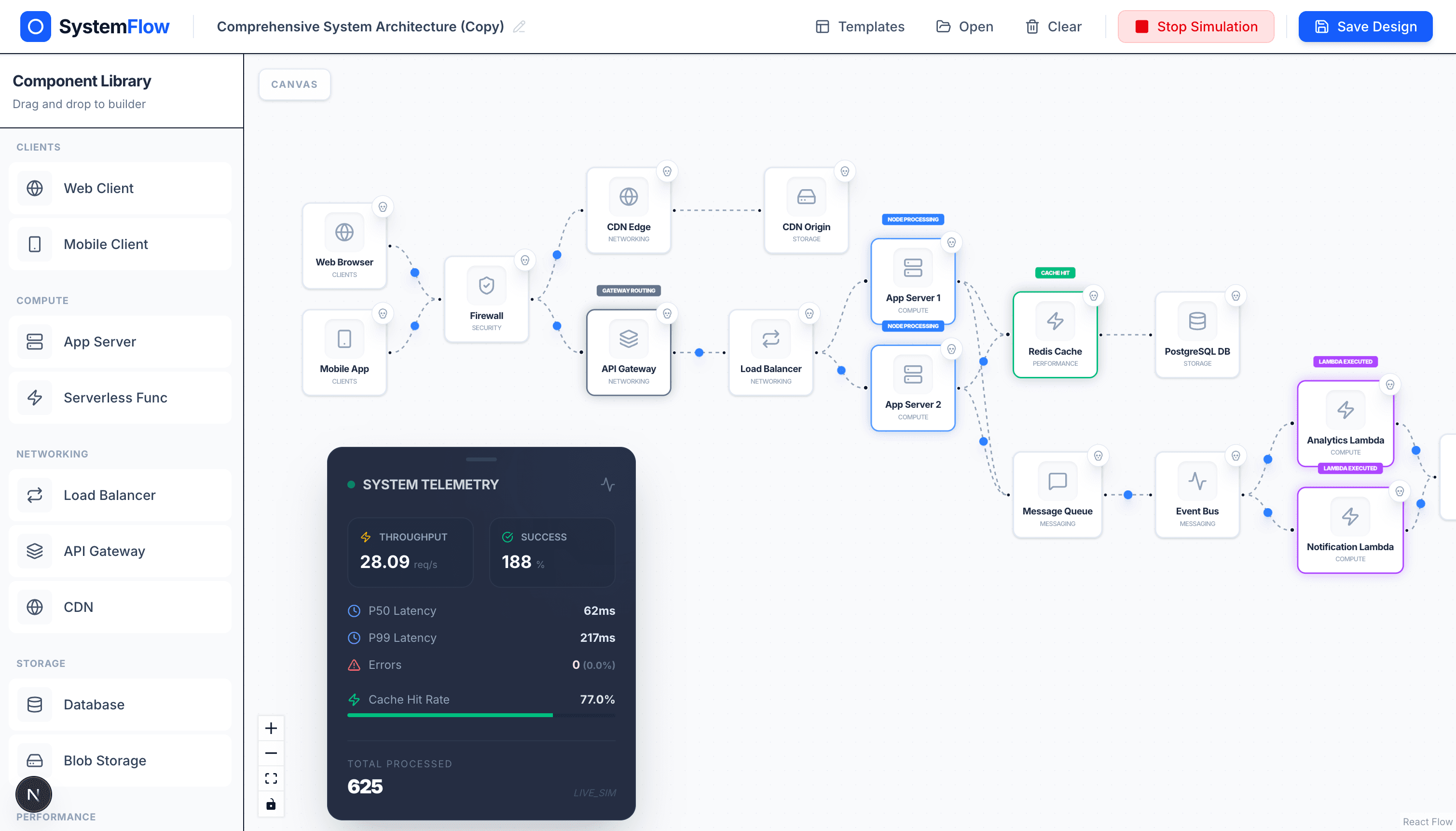
Project Overview
System design is often taught using static diagrams that don't capture the dynamic nature of distributed systems. SDApp was built to solve this by providing a "living" canvas where architecture isn't just drawn—it's simulated.
Built with a modern stack featuring Next.js and FastAPI, SDApp enables users to drag components like Load Balancers, Caches, and Databases onto a canvas, connect them, and immediately see how traffic flows through the system. This project serves as both an educational tool for learning system design and a practical utility for architecting real-world applications.
Key Features
- Visual Architecture Builder: An intuitive drag-and-drop interface powered by React Flow for designing complex system topologies.
- Real-time Discrete-Event Simulation: A custom SimPy-based backend engine that models realistic request flows and processing delays.
- Dynamic Component Registry: Highly configurable nodes including Load Balancers (Round Robin, Least Connections), Caches (configurable hit rates), and more.
- Interactive Metrics: Visual feedback on request movement, status changes, and performance bottlenecks as they happen.
- Predefined Templates: Jumpstart your design with industry-standard templates for common architectures like Global CDNs or Microservices.
Technical Implementation
Architecture
The platform uses a decoupled client-server architecture to ensure high performance during simulations. The frontend handles the visual graph state and animations, while the backend processes the simulation logic.
Frontend
The frontend is built with Next.js 16 (React 19) for optimal performance and SEO. React Flow (now @xyflow/react) is used for the graph engine, allowing for custom node development and interactive edges.
// Sample custom node state management with Zustand
interface SimulationStore {
  nodes: Node[];
  edges: Edge[];
  onNodesChange: (changes: NodeChange[]) => void;
  updateNodeData: (id: string, data: any) => void;
}

const useStore = create<SimulationStore>((set) => ({
  nodes: initialNodes,
  edges: initialEdges,
  onNodesChange: (changes) => {
    set({ nodes: applyNodeChanges(changes, get().nodes) });
  },
}));
Key Technologies:
- Framework: Next.js with App Router
- Graph Engine: @xyflow/react
- Styling: Tailwind CSS 4.0
- State Management: Zustand
Backend
The backend is a FastAPI server that communicates with the frontend via WebSockets. The core simulation logic uses SimPy, a discrete-event simulation library for Python.
# Core Simulation Engine Snippet
import simpy

class SimulationEngine:
    def __init__(self, event_callback):
        self.env = simpy.Environment()
        self.callback = event_callback
        self.components = {}

    async def run_simulation(self, until=1000):
        while True:
            # Step through simulation events
            self.env.step()
            await self.broadcast_events()
Infrastructure:
- API Framework: FastAPI
- Simulation: SimPy
- Real-time: WebSockets
- Language: Python 3.10+
Challenges & Solutions
Challenge 1: Real-time Data Synchronization
Problem: Synchronizing the simulation state (where thousands of requests might be flowing) with the frontend visual state without causing performance lag or visual stuttering.
Solution: I implemented a batching mechanism for simulation events. Instead of sending every single micro-event, the backend aggregates system state changes and broadcasts them at fixed intervals (60fps) over WebSockets. On the frontend, I used Zustand's selective updates to ensure only the necessary components re-rendered, and CSS animations for smooth movement of request packets.
Challenge 2: Dynamic Component Extensibility
Problem: Creating a system where new components (like a new type of DB or Message Queue) could be added without refactoring the entire engine.
Solution: I designed a Component Registry pattern. Each component is defined by a schema that describes its parameters, inputs, and outputs. The backend uses dynamic class loading to instantiate these components, and the frontend uses custom React Flow node types that automatically generate UI controls based on the component's metadata.
Results & Impact
- Educational Value: Successfully used by developers to visualize the "Thundering Herd" problem and Cache invalidation strategies.
- Performance: Handles systems with 50+ interconnected nodes and 500+ concurrent simulated requests at 60fps.
- User Experience: Drastic reduction in system design planning time by allowing for "what-if" testing of architectural changes.
Key Learnings
- Discrete-Event Programming: Mastered the use of generators and environment stepping in SimPy for complex simulations.
- Advanced React Flow: Gained deep expertise in building custom graph engines, including custom handles and edge animations.
- Low-Latency Communication: Optimized WebSocket payloads for real-time visualization.
Future Enhancements
- Support for Chaos Engineering (triggering random regional failures).
- Integration with Terraform to export visual designs into infrastructure code.
- Cloud-based persistence for saving and sharing architectures.
Technologies Used
Frontend:
- Next.js / React
- @xyflow/react (React Flow)
- Zustand
- Tailwind CSS
Backend:
- Python
- FastAPI
- SimPy
- WebSockets
DevOps:
- Docker
- GitHub Actions